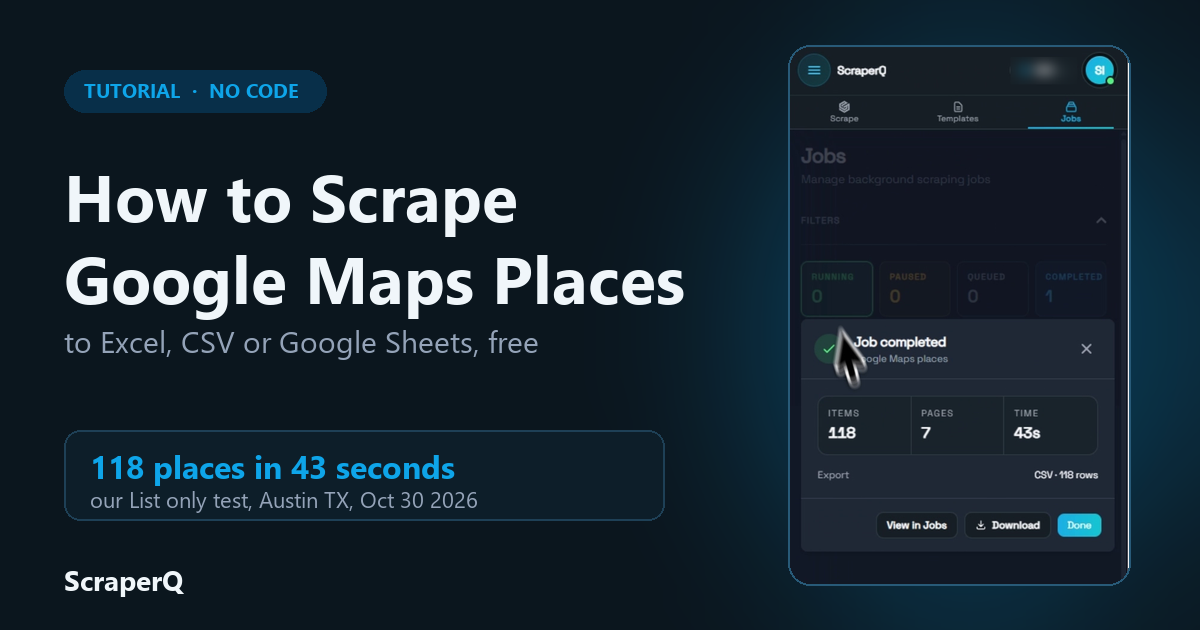
To scrape Google Maps to Excel for free, install the ScraperQ Chrome extension, sign in with Google, open a Google Maps search, and run the prebuilt Google Maps places template. Each place becomes one row with its name, address, phone, website, rating, review count and opening hours. You export it to Excel, CSV, JSON or Google Sheets.
Scraping in the extension is free, with no page or data limit, for anyone who signs in with Google (as of November 2026).
Key takeaways
- In our biggest test, a batch of 10 Google Maps searches gave 1,000 places from 56 pages in 11 minutes 30 seconds, in one CSV file. The job stopped at the 1,000-place cap we set, after 5 of the 10 searches.
- Google decides which places a search shows, so split a big area into smaller searches and run them as a batch.
- It reads public Google Maps pages in your own browser. No login, and no code.
Watch the video tutorial
Prefer to watch? The video shows the whole 1,000-place run, from installing the extension to the Excel file: Scrape 1,000 Google Maps places to Excel (YouTube).
What data can you get from Google Maps?
The Google Maps places template has three modes. List only reads the places in your search results. List then details also opens each place. Details only reads place links you paste in.
List only returns 24 fields. List then details returns the same 24 plus two more, plus code and rating histogram. The 50 data fields on the template card count both modes (24 + 26), so one row has at most 26 fields. The examples below are from the first place in our London test run, as it was on October 18, 2026.
| Field | List only | List then details | Example from our run |
|---|---|---|---|
| Name | yes | yes | Blacklock Soho |
| Data ID | yes | yes | 0x487604d386103039:0x43d15166fe8299f5 |
| Place ID | yes | yes | ChIJOTAQhtMEdkgR9ZmC_mZR0UM |
| Place URL | yes | yes | link to the place on Google Maps |
| Category | yes | yes | Steak house |
| Categories | yes | yes | Steak house, Chophouse restaurant, Meat dish restaurant, Restaurant |
| Address | yes | yes | 24 Great Windmill St, London, W1D 7LG, United Kingdom |
| City | yes | yes | London |
| Postal code | yes | yes | W1D 7LG |
| Country | yes | yes | GB |
| Phone | yes | yes | +44 20 3441 6996 |
| Phone (international) | yes | yes | +442034416996 |
| Website | yes | yes | the restaurant's own website |
| Rating | yes | yes | 4.7 |
| Review count | yes | yes | 5305 |
| Price level | yes | yes | empty for this place |
| Latitude | yes | yes | 51.5117… |
| Longitude | yes | yes | -0.1346… |
| Opening hours | yes | yes | Sunday: 11:45 AM–8 PM; Monday: 12–3 PM; and so on for each day |
| Open now | yes | yes | Open · Closes 8 PM (at the time of the run) |
| Business status | yes | yes | empty for this place |
| Description | yes | yes | Atmospheric basement restaurant and bar for seared meat chops, plus cocktails from trolley carts. |
| Time zone | yes | yes | Europe/London |
| Thumbnail | yes | yes | link to the place's photo |
| Plus code | no | yes | GV68+P4 London, United Kingdom |
| Rating histogram | no | yes | empty in our run |
Some fields come back empty when Google does not show that detail for a place. In our 10-place London run, price level, business status and rating histogram were empty for every place. Plan for blank cells and filter them in Excel.
Step by step: from a Google Maps search to a spreadsheet
Step 1: Install the extension and find the template
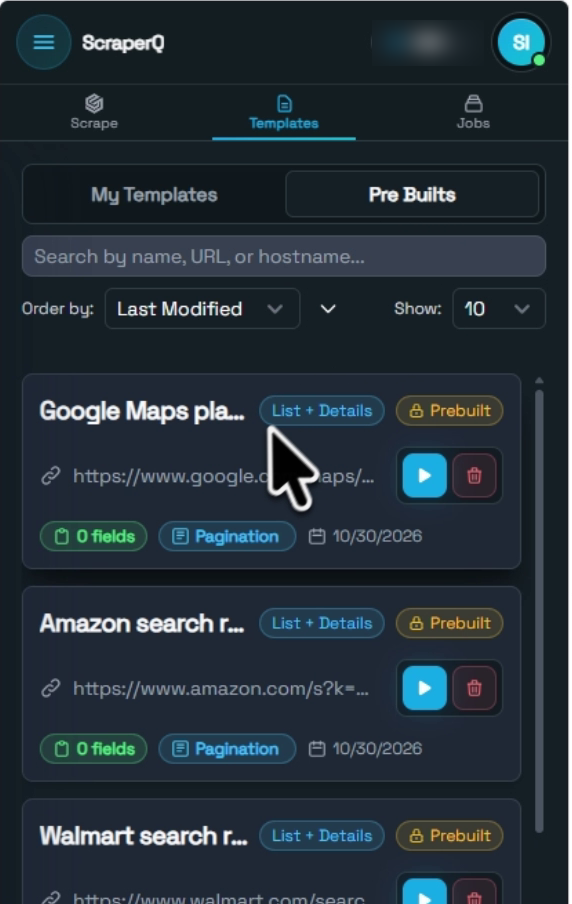
Add ScraperQ to Chrome or Brave and sign in with your Google account. No card is needed. Open the side panel, go to Templates, then Pre Builts, and find Google Maps places.
Step 2: Search Google Maps
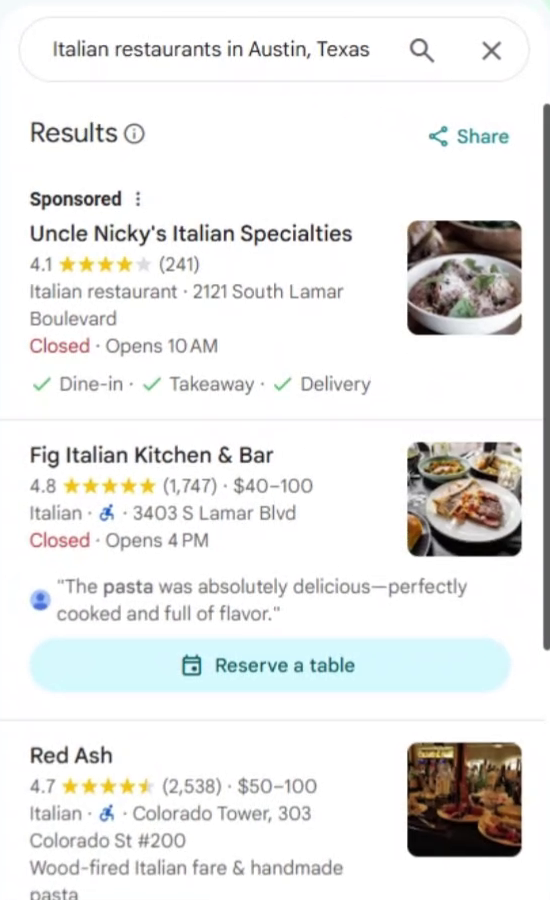
Open Google Maps and search the way you normally would. We searched for "Italian restaurants in Austin, Texas". Keep that tab open, because the template runs on the page you have open.
Step 3: Set up the run
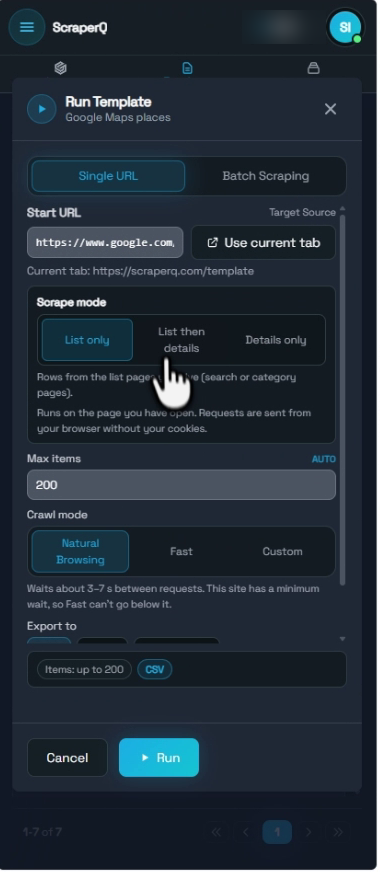
Click the play button on the Google Maps places template. In the Run Template dialog, click Use current tab to fill in the start URL. Then:
- Choose List only for the place list, or List then details to open each place.
- Set Max items for how many places you want. The template starts at 200.
- Keep Natural Browsing as the crawl mode. The dialog says it waits about 3 to 7 seconds between requests.
- Pick your export format: Excel (.xlsx), CSV, JSON or Google Sheets.
Step 4: Watch the job and download your file
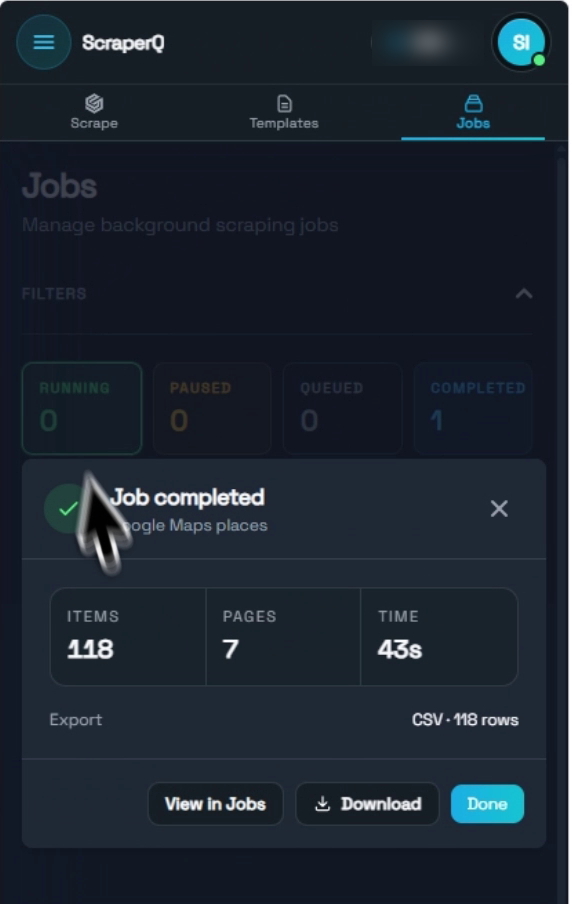
Click Run. The job runs in the Jobs tab, where you see the places extracted, pages per minute and time so far. You can open the live data table to see rows as they come in. When the job ends, the Job completed panel shows the items, pages and time. Click Download to save the file.
Want to try it on your own search? Open the Google Maps places template and run it on any Google Maps results page.
How do you scrape several Google Maps searches at once?
Use the Batch Scraping tab in the Run Template dialog. Paste one Google Maps search link per line, or upload a CSV or Excel file with one link per row. The dialog counts the links it read, and the job runs them one after another into one export file.
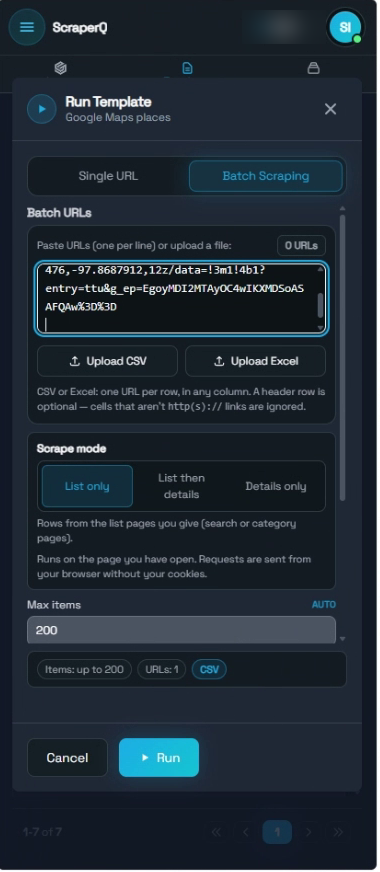
In our test we pasted two searches, Italian restaurants and Mexican restaurants in Austin, Texas. The job finished with 296 places from 16 pages in 1 minute 51 seconds, all in one CSV file with 296 rows. To cover a whole city, use one search per area or per category, all in one batch.
Our 1,000-place batch
To see how far one job goes, we put 10 Google Maps search links in one batch and set Max items to 1,000. The job reached 1,000 places after the first 5 searches and stopped there, because that was the cap. It took 11 minutes 30 seconds across 56 pages, and the export was one CSV file with 1,000 rows.
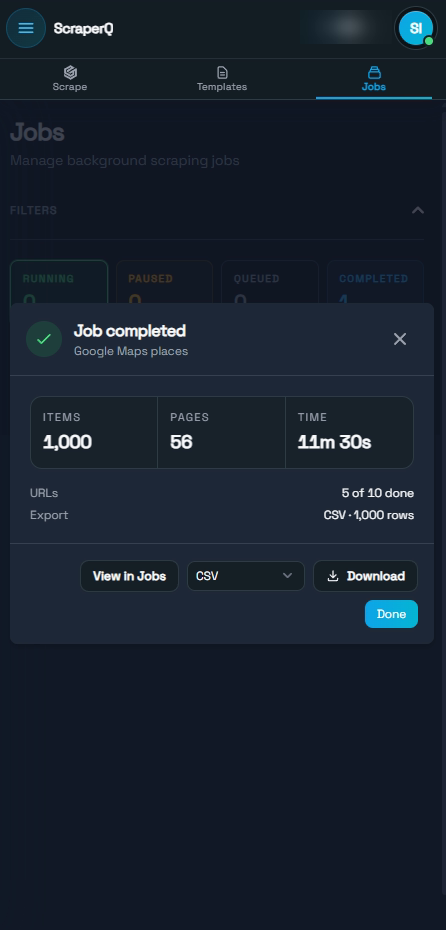
If you want every search in the batch to run, raise Max items or split the links into smaller batches.
How fast is it, and how many places can you get?
One search, List only: 118 places from 7 pages in 43 seconds, Italian restaurants in Austin, Texas, on October 30, 2026.
Two searches in one batch: 296 places from 16 pages in 1 minute 51 seconds.
Ten searches in one batch, Max items 1,000: 1,000 places from 56 pages in 11 minutes 30 seconds. The job stopped at the cap after 5 of the 10 searches.
You get the places Google Maps shows for your search. Google decides that list, so a broad search such as "restaurants in Texas" does not return every restaurant in Texas. Split it into narrower searches by area and category instead. Results also change with your location and over time, so two people running the same search can get different lists.
List then details opens every place one by one, so it takes longer than List only. We did not time it on this run.
How do you export Google Maps data to Excel?
Pick Excel (.xlsx) in the run dialog before you start. CSV also opens straight in Excel. In our test we exported CSV and opened it in Excel, with one row per place and one column per field. Google Sheets sends the rows to a new or existing sheet and needs your Google sign-in.
See export options for each format.
Is it free, and what are the limits?
Scraping in the extension is free for anyone who signs in with Google. There is no page limit and no data limit (as of November 2026). We may add a cap later as more people use it. AI features, such as building a new template or repairing one, use AI credits. Running the prebuilt Google Maps template is regular scraping.
The limits that matter for Google Maps:
- Max items per job. Set it in the run dialog. The template starts at 200; we ran a batch with it set to 1,000.
- Google decides the list. You get the places your search shows. Split big areas into smaller searches.
- Public pages only. It does not log in to a Google account and does not get past blocks or CAPTCHAs.
- Your browser does the work. Requests go out from your browser without your cookies, at the pace of the crawl mode you pick. Fast mode cannot go below the site's minimum wait.
- Some fields can be empty. Price level, business status and rating histogram were empty in our London run.
Is it legal to scrape Google Maps?
This is not legal advice. The template reads public Google Maps pages, the same ones any visitor sees, with no login. Read Google's terms before you collect data and check what they allow for your use. Business listings can include phone numbers and websites, so check your local data protection rules before you contact businesses, and keep a gentle request pace.
FAQ
Can I scrape Google Maps without coding? Yes. Open a Google Maps search, run the prebuilt Google Maps places template from the ScraperQ side panel, and download the file. You choose the mode, the number of places and the export format in one dialog.
How many fields do I get for each place? List only gives 24 fields, including name, address, phone, website, rating, review count and opening hours. List then details adds plus code and rating histogram. Some fields stay empty when Google does not show them.
Can I scrape a list of Google Maps place links? Yes. Use Details only mode with Batch Scraping and paste the links one per line, or upload a CSV or Excel file with one link per row.
How many Google Maps places can I scrape in one job? As many as your searches return, up to the Max items you set. The extension has no data limit (as of November 2026). In our biggest test, one batch job of 10 searches stopped at its 1,000-place cap after 5 searches, in 11 minutes 30 seconds.
Can I save Google Maps data as CSV or Google Sheets instead of Excel? Yes. Choose CSV, JSON or Google Sheets in the run dialog before you start the job.
How we tested
- Template: Google Maps places (`google-maps-places`), prebuilt
- Speed and batch runs (October 30, 2026): List only, Max items 200, Natural Browsing, CSV. One search, "Italian restaurants in Austin, Texas": 118 places, 7 pages, 43 seconds, 118 rows. A batch of that search and "Mexican restaurants in Austin, Texas": 296 places, 16 pages, 1 minute 51 seconds, one file with 296 rows. The screenshots in this guide come from the screen recording of that session.
- 1,000-place batch (November 2, 2026): 10 Google Maps search links in Batch Scraping, Max items 1,000, CSV export. 1,000 places, 56 pages, 11 minutes 30 seconds; 5 of the 10 links were done when the cap was reached; one file with 1,000 rows. The search terms and crawl mode were not recorded.
- Video run (November 2, 2026): the video above shows a second 1,000-place batch from the same day: 10 Google Maps search links uploaded as an Excel file, Max items 1,000, 1,000 places from 57 pages in 14 minutes 38 seconds, 5 of the 10 links done at the cap.
- Field run (October 18, 2026): a restaurant search in central London, List only and List then details, 10 places each. The field examples above come from this run.
- Extension version: not recorded for these runs.
The speed figures come from two sessions. Your results will vary with the search, your location and how Google responds.
More guides
Browse all ScraperQ templates or read more on the ScraperQ blog.
Try ScraperQ for free
No coding required. Auto-healing selectors. Your templates work forever.
Add to Chrome